
AI Pre-Test
1. What does it do?
AI Pre-Test predicts the outcome of a real Behavio pre-test for your video ad, without running one. You get a data-backed read on your creative while there's still time to change it.
Your report includes:
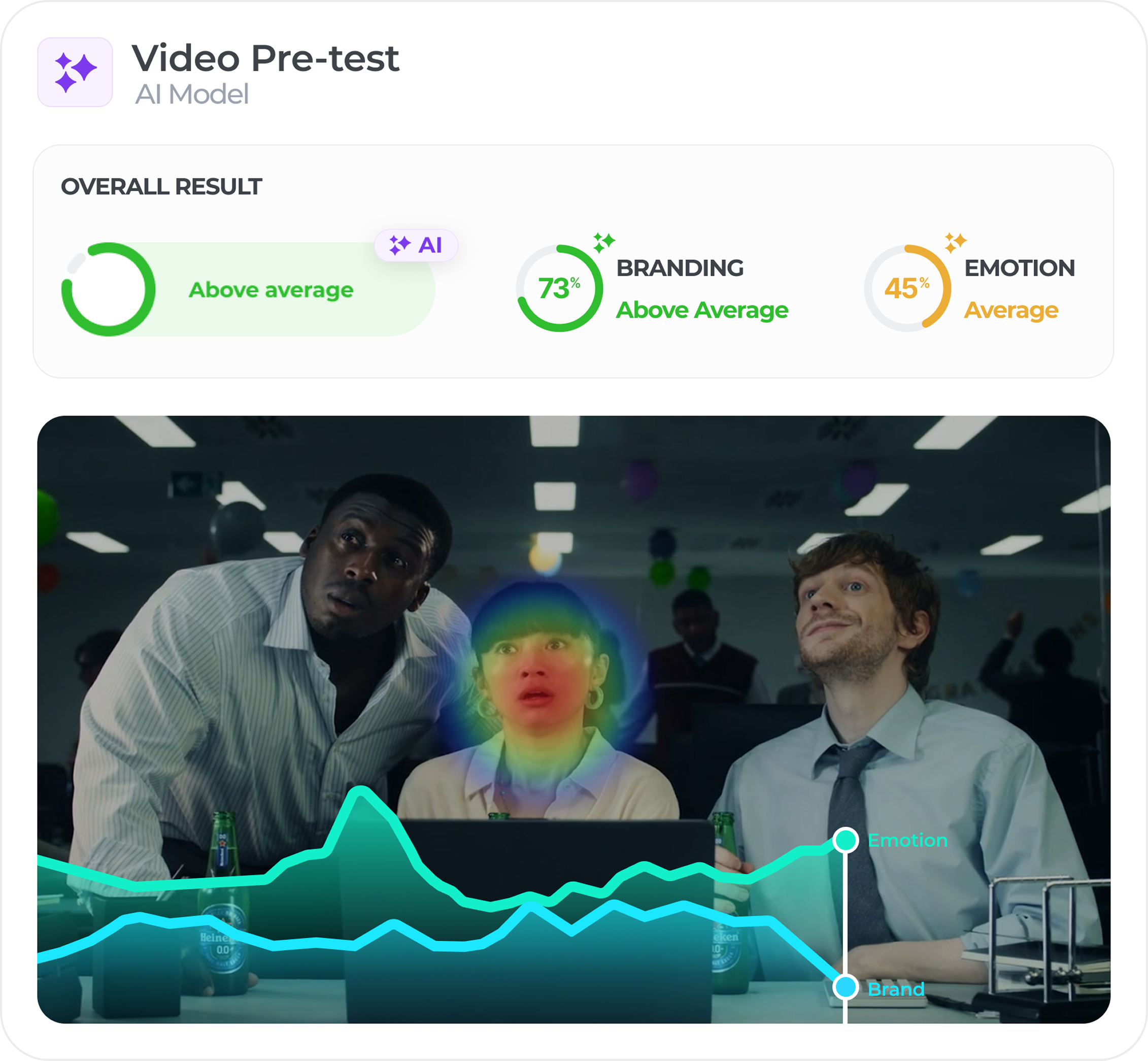
- Brand Recall: how many people are likely to name your brand after seeing the ad, unprompted. You also get a separate score for the first 5 seconds, which matters most in skippable online placements.
- Positive Emotion: how many people are likely to come away feeling positive.
- Overall Level: a combined read of both scores, showing your ad's overall potential. It shows a color and a label rather than a number.
- Brand and emotion curves: how both signals develop over the course of your video, so you can see exactly which moments work and which don't.
- Attention heatmap: where viewers' attention is predicted to land, second by second. It's a model estimate, not eye tracking.
Every score is compared against the market average, so you know right away whether a result is strong, average, or needs work.
Results come with Behavio Insights, which explains what the numbers mean and what to change.
2. How does it work?
AI Pre-Test is trained on more than 10 years of real Behavio ad tests and over 750,000 measured moments of attention, emotion, and brand impact from real people.
The model cuts your video into one-second slices and records what happens in each one: what's on screen, what text appears, whether your brand is visible, where attention is likely to land, and what's happening in the audio. That's why the report can point to the exact second causing a problem, not just tell you that a problem exists.
Your scores are read against the same benchmark database as our respondent-based tests, so the results are directly comparable.
3. How to use it
You'll find AI Pre-Test inside the Ad-Test section of the Behavio platform.
- Click + New Project to start a new ad testing project.
- Choose Video as your creative type. Look for the AI option available label.
- Select AI pre-test as your test type, then click Set up test.
- Upload your video by dragging and dropping the file or clicking to browse.
- Set your Brand & Country, then hit Start the test.
Your results will be ready in about 15 minutes.
Upload requirements
- Video up to 3 minutes and 500 MB.
- Supported formats: mp4, mov, qt, avi, 3gp, webm, mpg.
- Your video should be close to final: a finished film, a cut before final grade, or an AI-generated ad all work well.
4. How to read your results
Each score shows the predicted value. The color shows how it ranks against other campaigns in the Behavio benchmark database:
Color | Label | What it means |
|---|---|---|
🔴 Red | Below Average | A weak point to fix |
🟠 Orange | Average | In line with the market |
🟢 Green | Above Average | A real strength (90+ is exceptional) |
For example, a predicted Brand Recall of 70% at the 80th percentile means 70% of people would likely recall your brand, and your ad is ahead of 80% of campaigns in our database.
A few tips for reading your report:
- Check the first 5 seconds. A low score here matters even when the overall score looks healthy, because many online viewers never watch past it.
- Read the two curves together. An emotional peak where brand recall dips is attention you're paying for but not turning into brand memory.
- Don't split hairs. A gap of less than 5 percentage points between two cuts isn't a meaningful difference. Look at the curves to see where they really differ.
5. Get recommendations with Behavio Insights
Behavio Insights sits right next to your video and interprets the results for you:
- The Bottom Line: a quick summary of what your ad achieves.
- What Works Well: the specific elements driving your scores, like a distinctive logo or a sensory product close-up.
- Where to Improve: the exact moments where your curves drop.
- Scene by Scene: a breakdown of every scene, with a concrete edit for each weak one.
- Behavio Insights (AI Chat): ask your own questions, in your own language. If you ask something AI Pre-Test can't predict, the chat will tell you and point you to a Full Pre-Test.
Try quick prompts like:
- "I only have a minute, how did it do?"
- "What are the top 3 things the agency should fix?"
6. What it's for, and what it isn't
AI Pre-Test is built for the stage where you'd otherwise have no data at all. Use it to screen several cuts quickly, drop weak options early, and decide what's worth investing in further.
Where you are | What to use |
|---|---|
Several near-final cuts | AI Pre-Test to screen them all |
A few strong options | AI Pre-Test to narrow down, then a Full Pre-Test to confirm the top one or two |
Final cut, high media spend | Full Pre-Test, with AI Pre-Test as a quick sanity check |
Keep in mind that every result is a prediction. No real respondents are involved, so AI Pre-Test focuses on Brand Recall and Positive Emotion only. For things like message recall, negative emotion, audience segments, or what people say in their own words, you'll need a Full Pre-Test with real respondents.
AI Pre-Test works with video only. Static formats, audio-only ads, storyboards, and animatics aren't supported.